
How to Clean an Anti-Fatigue Mat in 6 Steps (Foam, Gel and Rubber)
Wipe foam and gel desk mats with water and a little mild dish soap, dry both the mat and the floor, and skip steam, hoses and washing machines unless your mat is built for them.
 By HomeOfficeAid
Updated November 28, 2026

How do you clean an anti-fatigue mat? For the foam, gel and polyurethane mats most people use at a standing desk, sweep or shake off loose dirt, wipe the top and bottom with a damp cloth and a little mild dish soap, wipe away the soap, and let the mat and the floor under it dry completely before you put it back. Mat makers such as GelPro, Teeter and iMovR all warn against steam cleaners, high-pressure water, washing machines and vacuums with a spinning brush roll, and several say harsh cleaners can damage the surface or void the warranty. Heavy rubber and PVC mats built for wet industrial areas are the exception: their makers allow hosing and stronger cleaning, but those are rarely the mats you find in a home office.
This is a research-based guide built from care instructions published by mat makers, including GelPro, WellnessMats, Wearwell, Ergomat, Teeter and iMovR, plus the care notes on the Amazon listings of the mats in our guide and workplace safety guidance from the Canadian Centre for Occupational Health and Safety (CCOHS). It is not a record of our own cleaning. Your mat’s label or manual always takes priority, because rules differ between brands. If your mat is worn out rather than dirty, our guide to the best anti-fatigue mats for standing desks compares sizes, thickness and edge design.
What You Need
- A soft broom, a dry mop or a stick vacuum without a brush roll
- Two soft cloths or sponges: one for washing, one for wiping off soap
- Warm water and a mild dish soap
- A dry towel or paper towels
- Your mat’s care label, manual or the maker’s care page
What Kind of Mat Do You Have? Cleaning by Material
The material decides how much water and scrubbing a mat can take. Check the label, the box or the product page before you start.
| Mat type | Typical use | Cleaning the makers allow | Avoid |
|---|---|---|---|
| Polyurethane foam or gel comfort mats (GelPro, WellnessMats, iMovR, Ergodriven Topo) | Standing desks, kitchens | Damp cloth or mop with water and mild soap; sweeping or a stick vacuum without a brush roll | Steam, hot water extraction, high-pressure water or air, power vacuum brush rolls, folding |
| Flat foam mats with a textured top (for example, the KANGAROO and Amazon Basics mats in our guide) | Standing desks, kitchens | Wipe with a damp cloth, per the Amazon listings | Soaking, leaving water on or under the mat |
| Dry-area sponge, PVC sponge and urethane mats (Wearwell) | Workstations, counters | Sweep or dry-mop; wet-mop with mild soap or detergent with a pH between 4 and 9 | Harsh or caustic chemicals |
| Molded rubber and PVC wet-area mats (Wearwell, some Ergomat lines) | Industrial and commercial wet areas | High-pressure hose up to 500 psi with water up to 160°F, per Wearwell; mild soap or detergent with a pH between 4 and 9 | Steam unless the maker recommends it, degreasers, caustic chemicals, machine washing |
The wet-area methods in the last row apply only to mats built for them. Using a hose or pressure washer on a foam desk mat goes against what foam mat makers such as GelPro and iMovR tell their customers.
How to Clean an Anti-Fatigue Mat in 6 Steps
These steps follow the care instructions for foam, gel and polyurethane mats, the kind most often used in front of a standing desk.
1. Check the care instructions and warranty
Find your mat’s care label, manual or the maker’s care page before you choose a cleaner. Brands do not agree on every detail: GelPro says not to use any household cleaner other than mild dish soap, while iMovR allows general-purpose cleaners for its EcoLast mat but rules out anything with bleach, ammonia, alcohol or acetone. GelPro, iMovR and Ergomat each say that not following their care instructions can void the warranty, so the label is worth a minute of your time.
2. Remove loose dirt and dust
Lift the mat and shake it outside, or sweep it with a soft broom or dry mop. Wearwell recommends sweeping or dry-mopping its dry-area mats regularly. If you prefer to vacuum, use a stick vacuum without a brush roll, as WellnessMats suggests. GelPro, iMovR and Teeter all warn that a power vacuum with a spinning brush can damage the mat surface.
3. Wipe the top with water and mild soap
For everyday dust and scuffs, a cloth or sponge dampened with plain water is often enough. WellnessMats says most spills clean up with warm water and a towel or mop, and recommends mild soap and water for harder stains. For a sticky or greasy spot, add a small amount of mild dish soap to the water, as GelPro and Teeter recommend. Wring the cloth out well so you are wiping, not soaking. Wipe the whole surface, paying attention to the area where you stand most.
4. Clean the bottom gently
Turn the mat over and wipe the underside as well. GelPro says to lightly wipe the bottom of its mats with a cloth or paper towel and not to scrub it, because scrubbing can damage the non-slip backing. WellnessMats recommends cleaning the bottom of its mats from time to time to help keep them from moving on the floor, since dust under a mat can make it slide.
5. Remove soap and dry the mat completely
Go over both sides with a second cloth dampened with clean water to take off any soap, then dry the mat with a towel. Teeter’s instructions say to dry the mat thoroughly, and Ergomat’s chart for its dry-area mats calls for careful wiping so that all water is removed. If the backside of an Ergomat dry-area mat gets wet, the company says to leave the mat lying upside down until all the moisture has evaporated. Let the mat dry flat. GelPro and Teeter both warn that folding a mat can leave permanent creases, and GelPro also says not to store its mats rolled.
6. Clean and dry the floor before you put the mat back
While the mat is up, sweep or mop the floor where it sits. GelPro and Teeter both say the floor must be completely dry before the mat goes back down. GelPro warns that moisture trapped under a mat can lead to mold or mildew and can damage the mat and some types of flooring. WellnessMats recommends lifting its mats and cleaning under them every two weeks to help prevent color differences on the floor beneath. Once the mat is back, check that it lies flat and does not slide when you step on it.
Cleaning Methods to Avoid
These are the methods that foam and gel mat makers specifically warn against. Mats made for industrial wet areas follow different rules, so check your label.
| Method | What the makers say |
|---|---|
| Steam cleaning or hot water extraction | GelPro and iMovR say these can damage the mat; Teeter also lists steam cleaners. Wearwell says not to use steam on its wet-area mats unless specifically recommended. |
| High-pressure water or air | Ruled out by GelPro, iMovR and Teeter for their comfort mats |
| Washing machine or dishwasher | Teeter rules out washing machines; iMovR rules out dishwashers and commercial washers; Wearwell says not to machine wash its mats |
| Power vacuum with a rotating brush | GelPro, iMovR and Teeter warn it can damage the surface |
| Bleach, ammonia, alcohol or acetone | iMovR says these damage its mats and void the warranty |
| All-purpose, window or floor cleaners and polishes | GelPro and Teeter say to use only mild dish soap and water; iMovR is an exception and allows general-purpose cleaners |
| Degreasers | Teeter rules them out for its desk mat; Wearwell rules them out for its wet-area mats |
If you want to use a specific cleaner or disinfectant, ask the maker first. WellnessMats recommends checking any chemical on its material before use and offers a free sample for that purpose.
Safety Checks While You Clean
A clean mat is easier on your floor, but a mat is also a trip and slip point. CCOHS advises that mats should not slip or create a trip hazard and should have sloped edges. Cleaning is a good time to look for problems:
- Curled or lifting edges. The Amazon listing for the KANGAROO mat in our guide says to stop using the mat if its edges curl.
- Water on or under the mat. The same listing says the mat is not slip-resistant and that water on or under it should be wiped up. Teeter says not to leave spills on its mat.
- Wet feet. GelPro says its mats are not meant for wet areas and that some surfaces can be slippery when your feet are wet.
- Cracks, tears or a backing that no longer grips. These are signs the mat is reaching the end of its life rather than something cleaning will fix.
Standing on a mat also raises you slightly, so if you replace a worn mat with a thicker one, recheck your standing desk height.
How to Keep a Desk Mat Clean Longer
- Wipe spills right away. A quick wipe stops liquid from reaching the underside or the floor.
- Keep heavy furniture and chair casters off it. GelPro says rolling furniture or equipment onto its mats can leave permanent dents, and Teeter says not to put heavy objects on its mat.
- Skip stiletto heels. GelPro, Teeter and iMovR all warn that sharp high heels can damage the surface.
- Keep your shoes and the mat free of debris. Teeter recommends this for best results, and grit is what scuffs the top layer over time.
- Clean the desk area on the same schedule. If you are already wiping down your workspace, our guides on how to clean a keyboard, how to clean a mouse pad and how to clean an office chair cover the other surfaces you touch every day.
A mat that stays clean and flat is also one you are more likely to use. If you are building up to longer standing sessions, our guide on how long to stand at a standing desk covers how to split your day between sitting and standing.
Desk Mats With Simple Wipe-Clean Care
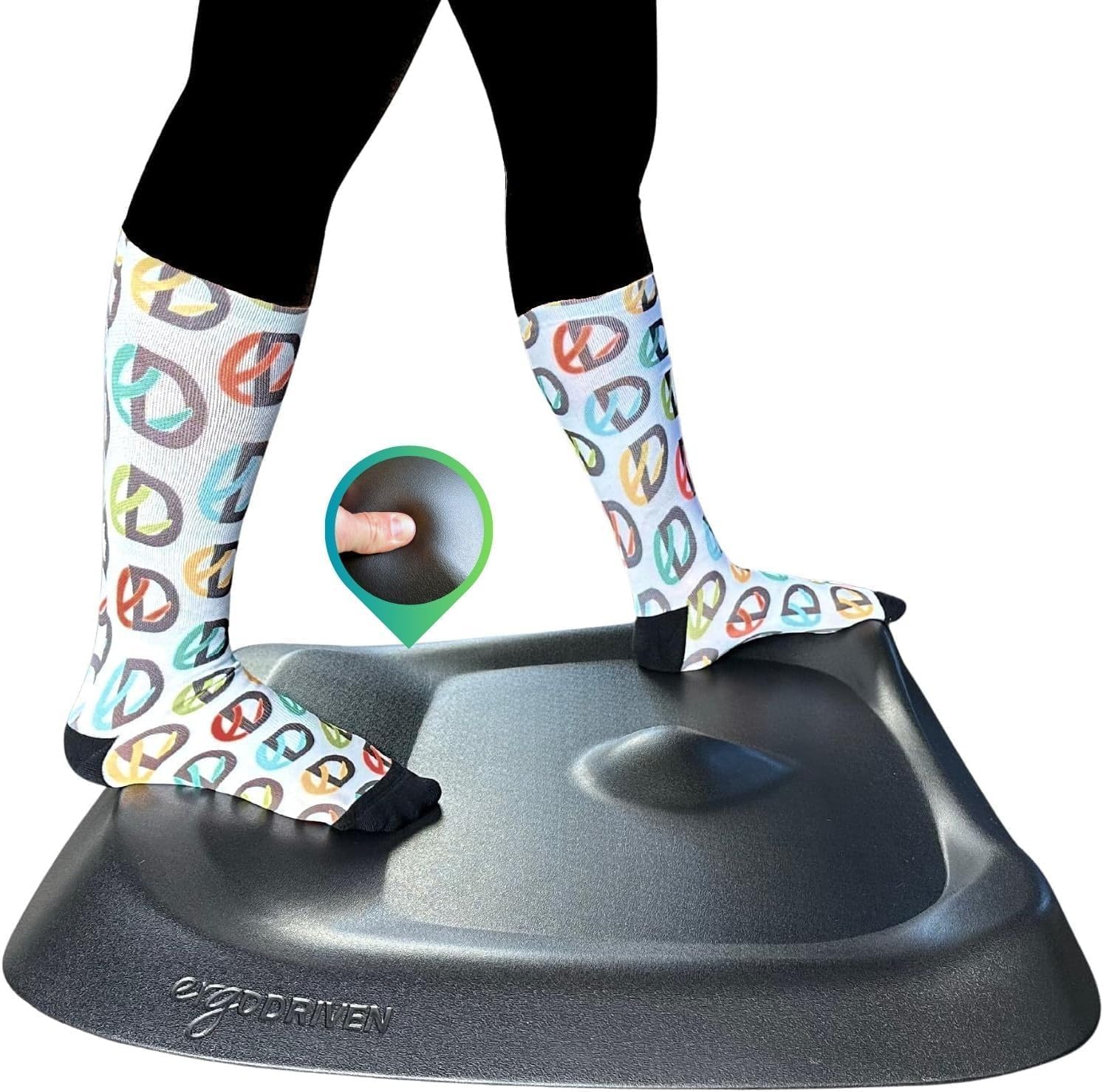
If you are replacing a worn mat, these three from our guide to the best anti-fatigue mats all list a damp cloth as their care method: the KANGAROO 20×39 flat foam mat for wide desks, whose listing also warns that it is not slip-resistant and should be retired if the edges curl; the Amazon Basics 32 x 20 inch foam mat for a simple single-monitor setup; and the contoured polyurethane Ergodriven Topo for people who shift their feet while they stand. Check each listing’s care notes and warnings before you buy.
Affiliate disclosure: As an Amazon Associate I earn from qualifying purchases. Links to Amazon in this article are affiliate links. Learn more.
Pros
- 39 in wide for long desks
- 0.75 in high-density foam
- Beveled edges, wipe-clean top
Cons
- Listing says not slip-resistant
- Indoor use only

Pros
- Common 32 x 20 in size
- Light 2.6 lb, easy to move
- Wipe with a damp cloth
Cons
- No beveled edge or grip stated
- Narrower than the Kangaroo
Pros
- Contoured surface invites shifting your feet
- 29 x 26.25 in footprint
- 7-year warranty per listing
Cons
- Listed 2.7 in thick: raise the desk
- Heavier at 8 lb
Frequently Asked Questions
Can you put an anti-fatigue mat in the washing machine?
No, not the foam, gel or rubber mats covered here. Teeter rules out washing machines for its desk mat, iMovR rules out dishwashers and commercial washers, and Wearwell says not to machine wash its mats. Wipe the mat by hand instead.
Can you use bleach on an anti-fatigue mat?
Not unless your mat’s maker says it is safe. iMovR says cleaners with bleach, ammonia, alcohol or acetone damage its mats and void the warranty, and GelPro limits cleaning to water and mild dish soap. Mats designed for medical or food settings may list specific disinfectants, so follow the label for those.
Can you hose off an anti-fatigue mat?
Only if it is a rubber or PVC mat made for wet areas and the maker allows it. Wearwell permits a high-pressure hose up to 500 psi with water up to 160°F for those mats. Foam and gel desk mats are a different case: GelPro, iMovR and Teeter all rule out high-pressure water.
How often should you clean an anti-fatigue mat?
Wipe spills as soon as they happen and remove loose dirt regularly. WellnessMats recommends lifting its mats and cleaning under them every two weeks. A full wash with soap is only needed when a damp cloth alone no longer gets the surface clean.
Why does my anti-fatigue mat slide on the floor?
Dust on the bottom of the mat or on the floor is one common cause. WellnessMats recommends cleaning the bottom of its mats from time to time to help prevent movement, and the floor should be completely dry before the mat goes back down. Some mats are not designed to be slip-resistant at all, so check the listing or label.
Can you steam clean an anti-fatigue mat?
Not a foam or gel desk mat. GelPro and iMovR say steam cleaning can damage their mats, and Teeter also lists steam cleaners among the methods to avoid. Wearwell says not to use steam on its wet-area mats unless specifically recommended.
Conclusion
Cleaning an anti-fatigue mat is mostly about restraint. For a foam, gel or polyurethane desk mat, remove the dirt, wipe both sides with water and a little mild dish soap, take the soap off, and dry the mat and the floor completely before you put it back. Leave hoses, pressure washers and stronger chemicals to the industrial mats whose makers allow them, and follow your own mat’s label where it differs from this guide. If the edges curl, the backing stops gripping or the foam cracks, it is time to replace the mat rather than clean it again.
Sources
- GelPro, Care Instructions
- WellnessMats, How To Care For Your WellnessMat
- Wearwell, 24/Seven and ErgoDeck Maintenance: Mat Cleaning Guidelines (PDF, hosted by Greatmats)
- Ergomat, Choosing the Right Anti-Fatigue Mat: Usage and Cleaning (PDF)
- Teeter, Sit-Stand Desk Anti-Fatigue Mat User Instructions, document FM1040 (PDF on teeter.com)
- iMovR, EcoLast Premium Standing Mat Certifications and Care Instructions
- Canadian Centre for Occupational Health and Safety, Anti-fatigue Mats
- Amazon product listings for the Ergodriven Topo, KANGAROO 20×39 and Amazon Basics 32 x 20 mats (care notes and warnings, read 2026-11-15)
About the author

HomeOfficeAid writes reviews and buying guides for HomeOfficeAid.