
4 Best Anti-Fatigue Mats for Standing Desks
Four standing desk mats matched to different needs, from a contoured mat that invites movement to wide and simple flat mats. Specs and CCOHS advice.
 By HomeOfficeAid
Updated November 15, 2026
This article is general information, not medical advice. If you have foot, leg or back pain, talk to a qualified health professional.
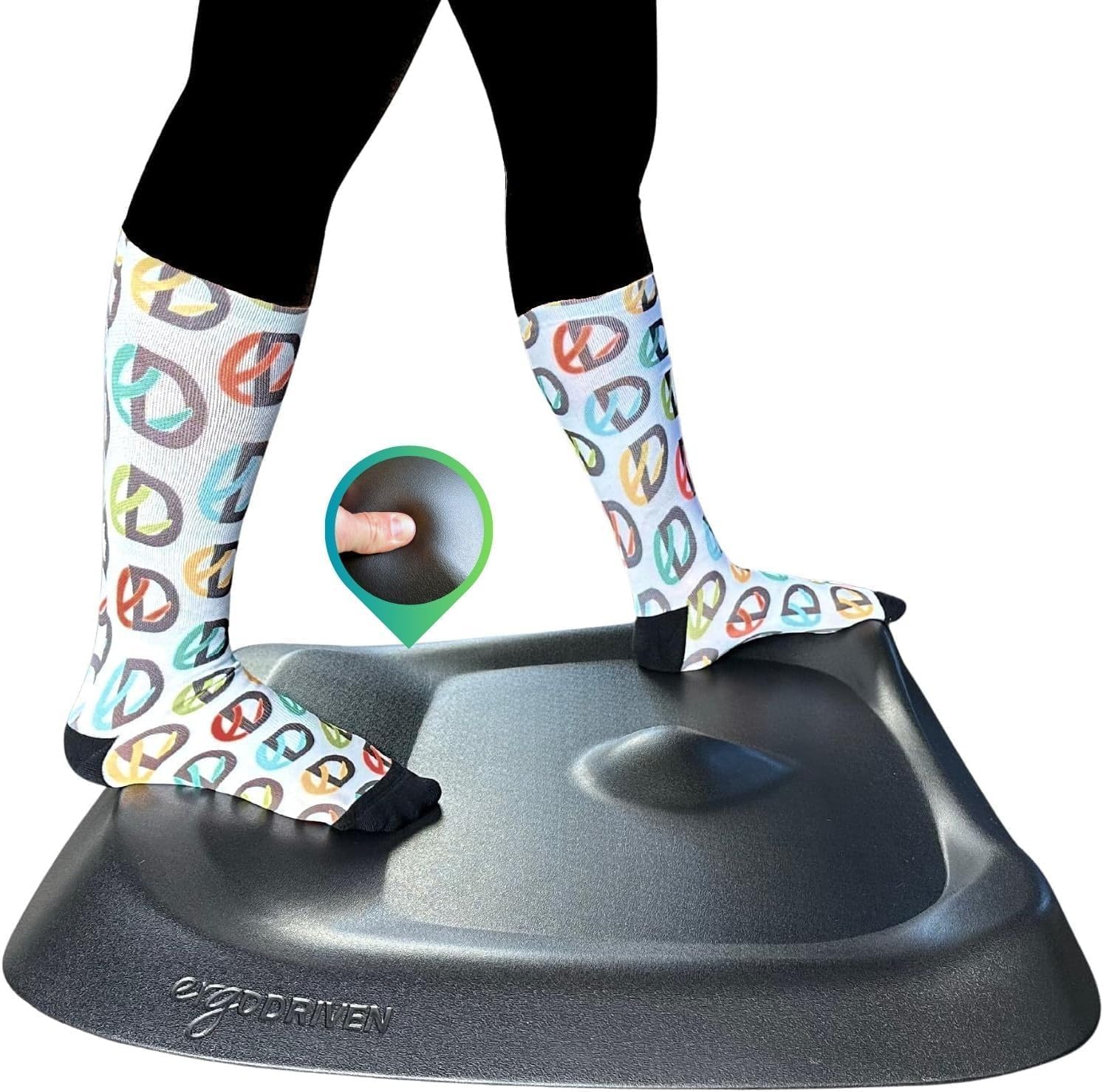
The right anti-fatigue mat for a standing desk is one that gives some cushioning without being so soft that you sink into it, has sloped edges so it is hard to trip over, and fits the floor space in front of your desk. For most home offices, a flat 3/4-inch foam mat around 20 x 32 inches covers the basics. If you tend to stand still for long stretches, a contoured mat that invites you to shift your feet is worth a look; if you move side to side between two monitors, go wider.
Here is the short version by need:
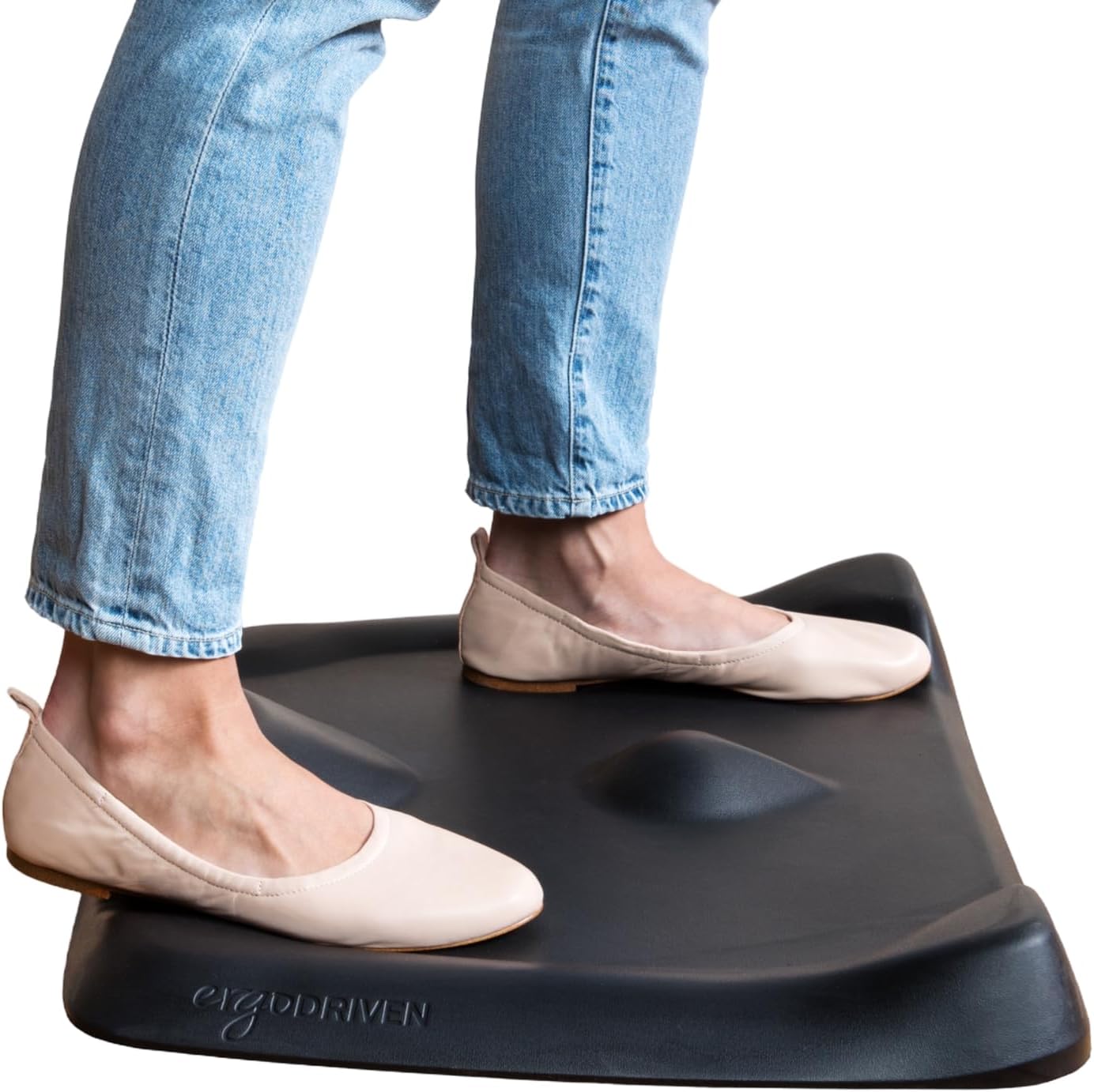
- Encouraging movement while you stand: a contoured, not-flat mat such as the Ergodriven Topo.
- Small spaces and narrow desks: the smaller Topo Mini.
- Wide desks and two monitors: a 39-inch-wide flat mat such as the Kangaroo 20×39.
- A simple, light flat mat: the Amazon Basics 32 x 20 inch mat.
A mat raises where you stand, so plan for it when you set your desk height. Our guide to standing desk height shows how to measure, and our best standing desks guide covers frames with enough range to spare.
How We Chose
This is a research-based guide. We did not try these mats ourselves. We started from the selection advice published by the Canadian Centre for Occupational Health and Safety (CCOHS): choose a mat with some elasticity, sloped edges and no slip or trip hazard, and remember that softer and thicker is not always better. We then compared the manufacturers’ listed size, thickness, material, edge design and care instructions, and we only included mats that were in stock and had a large number of customer ratings when we checked. Each pick covers a different need. Specs come from the Amazon listings and can change, so confirm the details on the product page before you buy.
We reviewed ten candidate listings for this guide. Only four met our availability and ratings bar at the time, so this list is shorter than a typical roundup rather than padded with mats we could not support.
Our Top Picks: Best Anti-Fatigue Mats for Standing Desks by Need
Pros
- Contoured surface invites shifting your feet
- 29 x 26.25 in footprint
- 7-year warranty per listing
Cons
- Listed 2.7 in thick: raise the desk
- Heavier at 8 lb
Pros
- Compact 25.2 x 19.2 in
- Contoured, not-flat surface
- Light at 4 lb
Cons
- Thickness not stated in listing table
- Less room to shift your stance

Pros
- 39 in wide for long desks
- 0.75 in high-density foam
- Beveled edges, wipe-clean top
Cons
- Listing says not slip-resistant
- Indoor use only

Pros
- Common 32 x 20 in size
- Light 2.6 lb, easy to move
- Wipe with a damp cloth
Cons
- No beveled edge or grip stated
- Narrower than the Kangaroo
Best for moving while you stand: Ergodriven Topo
Most anti-fatigue mats are flat. The Topo has a contoured surface with raised areas, which the manufacturer says is meant to get you shifting your feet instead of standing in one spot. It is built for the floor in front of a standing desk rather than a kitchen counter.
Key specs (per the Amazon listing):
- 29 x 26.25 in; listed thickness 2.7 in (the surface is contoured, so thickness varies across the mat).
- Polyurethane foam; the listing title describes it as PVC-free.
- Item weight 8 lb.
- An indentation lets you pull the mat out or push it back under the desk with your foot.
- Wipe with a damp cloth; 7-year manufacturer warranty, per the listing.
Consider: CCOHS cautions that too much cushioning can add to fatigue and trip risk, and at a listed 2.7 inches this is far taller than a flat 3/4-inch mat. Raise your desk to match, and step on and off with care. If you prefer a flat, even surface under your feet, a flat mat suits you better.
Best for small spaces: Ergodriven Topo Mini
The Mini uses the same contoured idea in a smaller footprint, which suits a compact desk, a desk converter on a small table, or a room where a full-size mat would get in the way of your chair.
Key specs (per the Amazon listing):
- 25.2 x 19.2 in.
- Polyurethane with a pebbled skin; the listing title says no PFAs or PVC.
- Item weight 4 lb.
- Contoured, not-flat surface like the full-size Topo.
Consider: The listing’s specification table does not state a thickness, so check the product page before you set your desk height. The smaller standing area leaves less room to shift your stance, which matters if you move between two monitors.
Best for wide desks: KANGAROO Cushioned Anti-Fatigue Mat, 20×39
At 39 inches wide, this flat mat gives you room to step side to side along a long desk or between two screens without stepping off the edge.
Key specs (per the Amazon listing):
- 39 x 20 in; 0.75 in thick.
- High-density foam with a waterproof, stain-resistant textured top.
- Beveled edges, per the listing’s feature list.
- Item weight 3.6 lb; wipe with a damp cloth.
Consider: The listing warns that the mat is not slip-resistant, that you should wipe up any water on or under it, and that you should stop using it if the edges curl. It is listed for indoor use only. On a smooth hard floor, check that it stays put before you rely on it.
Best simple flat mat: Amazon Basics 3/4″ Anti-Fatigue Standing Mat, 32 x 20
This is a plain rectangular foam mat in a common size that fits in front of most single-monitor desks. At 2.6 lb it is easy to lift and move when you switch to sitting.
Key specs (per the Amazon listing):
- 32 x 20 in; 0.75 in thick.
- Foam construction.
- Item weight 2.6 lb.
- Wipe with a damp cloth; previously sold under the AmazonCommercial brand.
Consider: The listing does not mention beveled edges, a non-slip backing or a warranty term, so check the product photos and page for edge shape and grip. At 32 inches wide it is narrower than the Kangaroo, which matters on a long desk.
Comparison Table
| Mat | Best for | Size | Thickness | Surface | Weight |
|---|---|---|---|---|---|
| Ergodriven Topo | Moving while standing | 29 x 26.25 in | 2.7 in (listed, contoured) | Contoured | 8 lb |
| Ergodriven Topo Mini | Small spaces | 25.2 x 19.2 in | Not stated in listing table | Contoured | 4 lb |
| KANGAROO 20×39 | Wide desks | 39 x 20 in | 0.75 in | Flat, textured, beveled | 3.6 lb |
| Amazon Basics 32 x 20 | Simple flat mat | 32 x 20 in | 0.75 in | Flat | 2.6 lb |
How to Choose an Anti-Fatigue Mat for a Standing Desk
Look for cushioning with some give, not maximum softness
CCOHS advises choosing a mat that provides some elasticity and notes that softer and thicker may not always be better. Its guidance on standing work goes further: too much cushioning can cause fatigue and increase the hazard of tripping. A firm foam that springs back is the goal.
Check the edges
CCOHS says mats should have sloped edges because they are less of a trip hazard, and that mats should not slip. Look for beveled edges in the listing or photos, and stop using a mat whose edges curl up.
Match the size to how you stand
Measure the floor area you actually use in front of the desk. If you stay centered on one screen, a mat around 20 x 32 inches is usually enough. If you step side to side across a wide desk or two monitors, a wider mat keeps both feet on it. Leave room for your chair to roll back when you sit.
Raise the desk by the mat’s thickness
Standing on a mat lifts your elbows by roughly the mat’s thickness, so add it when you set your standing keyboard height. This matters most with contoured mats, which are much taller than a flat 3/4-inch mat. See our standing desk height guide for the measuring steps.
Know what a mat cannot do
CCOHS is clear that a mat may not solve the entire problem and does not eliminate sore feet by itself. It recommends pairing a mat with supportive footwear, changing working positions often and having a seat available. Our guide on how long to stand at a standing desk covers how to alternate.
Frequently Asked Questions
Do I need an anti-fatigue mat for a standing desk?
Not always. CCOHS recommends covering hard floors such as concrete when you stand to work and lists wood, cork and rubber-covered floors as better choices. On a hard floor, a mat is a low-effort improvement; on thick carpet, the difference may be smaller.
How thick should a standing desk mat be?
CCOHS does not give a number, but it warns against thick foam-rubber mats because too much cushioning can cause fatigue and tripping. The two flat picks in this guide are 3/4 inch thick. Whatever you choose, raise the desk to account for the mat.
Can I roll my office chair onto an anti-fatigue mat?
None of these four listings describes the mat as a chair mat, so plan to move the mat aside or roll the chair off it when you sit. The Topo listing describes an indentation for sliding the mat in and out with your foot.
Is an anti-slip mat the same as an anti-fatigue mat?
No. CCOHS notes that anti-slip mats are not the same as anti-fatigue mats, and that standing on anti-slip matting can make feet feel sore because of friction inside the shoes.
How do I clean an anti-fatigue mat?
The Topo, Kangaroo and Amazon Basics listings say to wipe the mat with a damp cloth; the Topo Mini listing’s specification table does not list care instructions. The Kangaroo listing also says to wipe up any water that gets on or under the mat.
Conclusion
An anti-fatigue mat is one part of a comfortable standing setup, not a fix on its own. Pick a mat with some give rather than maximum softness, sloped edges and a size that matches how you move at the desk. The Topo suits people who want a contoured surface that invites movement, the Topo Mini fits tighter spaces, the Kangaroo 20×39 covers wide desks, and the Amazon Basics mat is a light, simple flat option. Then raise your desk by the mat’s thickness, keep alternating between sitting and standing, and if you sit with your chair raised for a converter, see our guide to adjusting an office chair.
Sources
- Canadian Centre for Occupational Health and Safety (CCOHS), Anti-fatigue Mats.
- CCOHS, Working in a Standing Position: Basic Information.
- Product specifications from the Amazon listings for each mat, linked above, reviewed November 2026.
About the author

HomeOfficeAid writes reviews and buying guides for HomeOfficeAid.