
4 Best Laptop Stands for Desks, Dorms and Travel
Four laptop stands matched to different needs: a one-piece fixed stand, a budget riser that comes apart, a foldable adjustable stand and a pull-out stand that reaches standing height.
 By HomeOfficeAid
Updated November 19, 2026
This article is general information, not medical advice. If you have neck, back or wrist pain, talk to a qualified health professional.
The best laptop stand for you is the one that lifts your screen to the height your desk and body need, folds or packs the way you work, and is paired with a separate keyboard and mouse. A fixed aluminum riser suits a laptop that lives on one desk, a foldable adjustable stand suits dorm rooms and travel, and a tall pull-out stand suits people who switch between sitting and standing. A stand on its own fixes the screen but not the keyboard, which is why OSHA says a laptop used as a main computer should get a separate keyboard and input device.
Here is the short version by need:
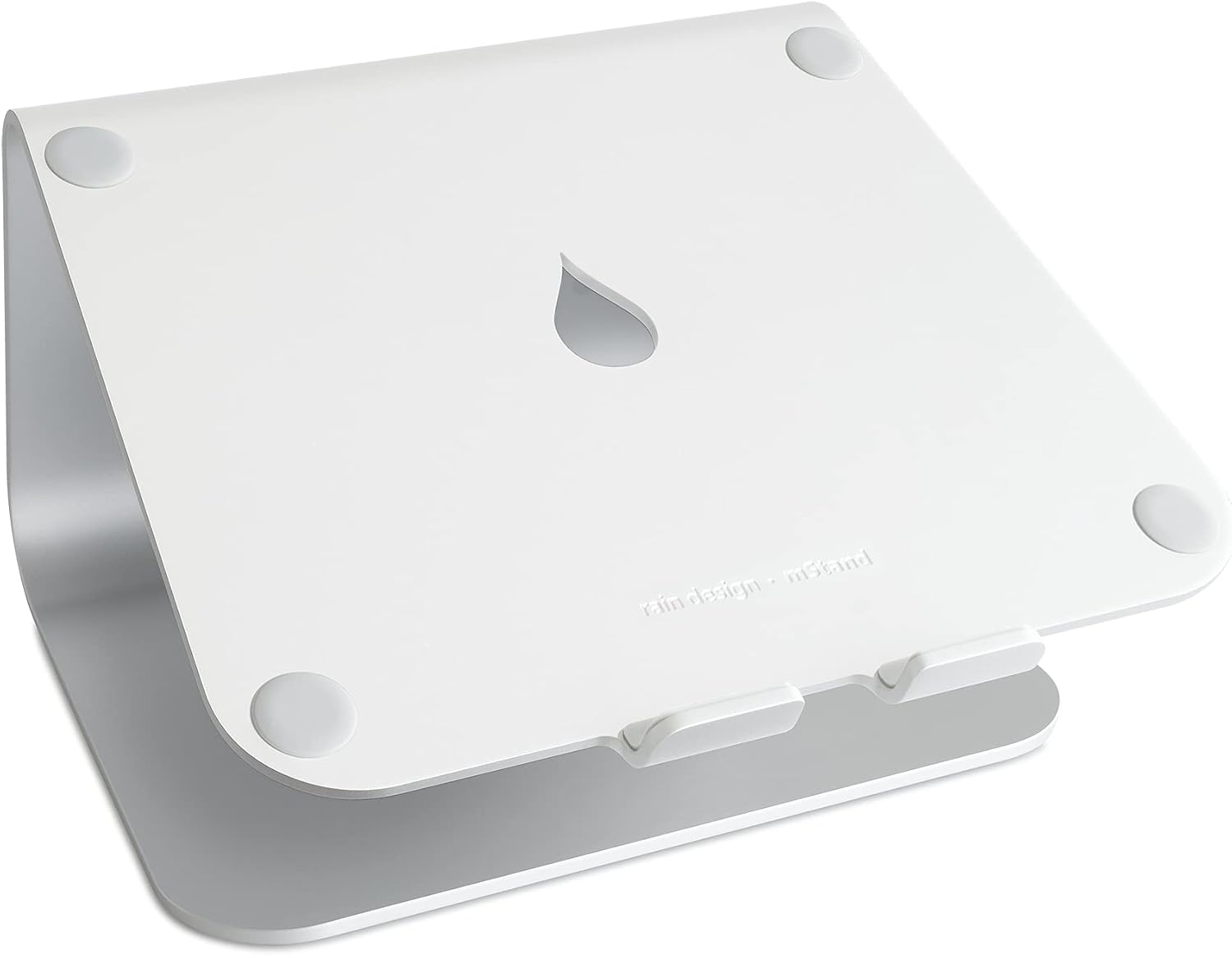
- Fixed stand for a home desk: the Rain Design mStand, a one-piece aluminum stand that lifts the screen 5.9 inches.
- Budget pick for students: the SOUNDANCE LS1, a 6-inch aluminum riser that comes apart into three pieces.
- Adjustable and foldable for dorms and travel: the Nulaxy C1, with two adjustable joints and a listed height range of 3.15 to 10.6 inches.
- Sitting and standing: the Nulaxy C5 pull-out stand, listed as adjustable from 1.2 to 20 inches.
If you are planning a whole workspace, our guide on how to set up a home office covers the chair, keyboard and lighting around the stand. If you use an external monitor instead of the laptop screen, compare your options in monitor arm vs monitor stand.
How We Chose
This is a research-based guide. We have not used these stands ourselves. We started from public ergonomics guidance: the OSHA Computer Workstations eTool on monitor placement and laptop use, and the Cornell University Ergonomics Web guidelines for computer workstations. Both point to the same problem with laptops: when the screen is at a comfortable height, the built-in keyboard is not. So we compared stands on the things that decide whether you can actually raise the screen enough: height range, adjustability, the size of laptop they fit, listed weight capacity, and whether they fold or come apart for carrying.
We only included stands that were in stock and had a large number of customer ratings when we checked. We reviewed ten candidate listings for this guide. Several, including some foldable models, were out of stock or their listing data could not be confirmed, so this list has four picks rather than a padded roundup. Specs come from the Amazon listings and can change; where a listing contradicts itself, we say so. Confirm the details on the product page before you buy.
Our Top Picks: Best Laptop Stands by Need
Pros
- One-piece aluminum, no joints
- Fixed 5.9 in lift with tilt
- Cable hole and keyboard space
Cons
- Height cannot be adjusted
- Does not fold; depth limit 10.4 in

Pros
- Fixed 6 in lift
- Comes apart into 3 pieces
- Fits 10 to 15.6 in laptops
Cons
- Height cannot be adjusted
- Lower 8.8 lb listed load

Pros
- Height 3.15 to 10.6 in
- Adjustable height and angle
- Folds flat for carrying
Cons
- Listing gives two load figures
- Too low for standing use

Pros
- Height 1.2 to 20 in
- Pull handle to switch heights
- Fits 10 to 17 in laptops
Cons
- About 4.2 lbs, heavy to carry
- Needs external keyboard at height
Best fixed stand for a home desk: Rain Design mStand
The mStand is a single curved piece of aluminum with no joints to adjust or loosen. It lifts the laptop screen by a fixed 5.9 inches and tilts the laptop slightly toward you. There is a 2-inch cable hole at the back and a space underneath where you can slide a keyboard when you are not using it. It is a good fit if your laptop stays on one desk and you already know a fixed lift of about 6 inches works for you.
Key specs (per the Amazon listing):
- Fixed lift of 5.9 inches (150 mm), with a built-in tilt.
- Single-piece aluminum with a sand-blasted, silver anodized finish.
- Fits laptops with a depth under 10.4 inches; the listing names MacBook models, most 14-inch PCs and 15-inch widescreen PCs.
- 2-inch cable management hole at the back.
- Listed item weight 1 kg; listed dimensions 8.82 x 5.98 x 9.92 inches.
- 1-year warranty against manufacturer defects.
Consider: The height cannot be changed, so if 5.9 inches is not enough to bring the top of your screen near eye level, this stand will not get you there. It does not fold, so it is not a travel stand. Check your laptop’s depth before buying, because larger 16- and 17-inch laptops can exceed the 10.4-inch limit. The listing shows a model number of 10032, while Rain Design’s other mStand listings use different numbers for each color, so match the color and model you want on the product page.
Best budget pick for students: SOUNDANCE LS1
The LS1 is a simple aluminum riser that lifts the screen by 6 inches. It comes apart into three pieces without tools, which makes it easier to pack in a bag at the end of a semester than a one-piece stand, and the open frame leaves space underneath for a keyboard. For a student who wants a fixed stand for a dorm desk, it covers the basics.
Key specs (per the Amazon listing):
- Fixed 6-inch elevation with a forward tilt.
- 5 mm thick aluminum alloy; listed load up to 8.8 lbs.
- Fits 10 to 15.6 inch laptops.
- Detachable 3-piece design, assembled without tools.
- Non-slip pads; open frame for airflow.
- Listed dimensions 10.24 x 8.86 x 5.71 inches; 1-year warranty.
Consider: Like the mStand, the height is fixed, and the listed range stops at 15.6-inch laptops, so it is not the pick for a 17-inch machine. Its listed load of 8.8 lbs is lower than the two Nulaxy stands. The listing describes a 6-inch elevation, while the overall stand height in the spec table is 5.71 inches, so the exact lift you get may differ slightly from the headline figure.
Best adjustable and foldable for dorms and travel: Nulaxy C1
The C1 has two adjustable joints, so you can change both height and angle by pushing or pulling, with no tools. It folds flat, which suits a shared dorm desk, a coffee shop table or a work bag. Its listed height range of 3.15 to 10.6 inches reaches higher than either fixed stand, which helps if you are tall or your chair sits high relative to the desk.
Key specs (per the Amazon listing):
- Screen height adjustable from 3.15 to 10.6 inches, with adjustable angle.
- Dual adjustable shafts; folds for carrying.
- Aluminum plate with vents and silicone pads.
- Listed load up to 22 lbs.
- Laptop fit listed as 10 to 16 inches in one place and 10 to 17 inches in another.
- 1-year manufacturer warranty.
Consider: Hinged stands have more moving parts than a one-piece riser, and the listing does not give the stand’s own weight, so you cannot judge from the listing how heavy it is to carry. The listing contradicts itself in two places: the feature list says it holds up to 22 lbs while the description says 44 lbs (20 kg), and the laptop fit is given as both 10 to 16 inches and 10 to 17 inches. Plan around the lower figures. If you need to stand while you work, its maximum height is too low for most people.
Best for sitting and standing: Nulaxy C5 Pull-Out Stand
The C5 uses a pull-out design that raises the laptop far higher than a typical riser. Nulaxy lists a range of 1.2 to 20 inches, which means the same stand can sit low on a desk while you are seated and then lift the laptop high enough to use a regular table while you stand. It also tilts and folds flat when you are done.
Key specs (per the Amazon listing):
- Height adjustable from 1.2 to 20 inches, with tilt.
- Retractable pull handle for switching heights.
- Listed load up to 22 lbs (10 kg); stand weight 1.88 kg (4.16 lbs).
- Fits 10 to 17 inch laptops.
- Aluminum panel with vent holes; rubber pads and two pivot joints.
- Listed folded dimensions 12.87 x 12.05 x 2.72 inches.
Consider: At about 4.2 lbs it is the heaviest stand here and not one you will want to carry every day. At standing height, the laptop keyboard ends up far above your elbows, so you need an external keyboard and mouse on the desk or a separate surface. A tall, narrow stand also carries more leverage than a low riser, so keep the laptop centered and avoid pressing hard on the raised screen. The spec table lists the style as “fixed base,” which only means the base does not rotate.
Comparison Table
| Stand | Best for | Height (listed) | Adjustable | Laptop fit (listed) | Load (listed) | Folds or comes apart |
|---|---|---|---|---|---|---|
| Rain Design mStand | Fixed home desk | 5.9 in lift | No | Depth under 10.4 in | Not listed | No |
| SOUNDANCE LS1 | Budget, students | 6 in lift | No | 10 to 15.6 in | 8.8 lbs | Comes apart (3 pieces) |
| Nulaxy C1 | Dorms and travel | 3.15 to 10.6 in | Height and angle | 10 to 16 in (also listed as 17) | 22 lbs (also listed as 44) | Folds |
| Nulaxy C5 Pull-Out | Sitting and standing | 1.2 to 20 in | Height and tilt | 10 to 17 in | 22 lbs | Folds |
How High Should a Laptop Stand Be?
High enough that the top of the screen is at or slightly below your eye level. That is OSHA’s guidance for monitors, and Cornell puts it a slightly different way: your eyes should line up with a point about 2 to 3 inches below the top of the screen casing, with the center of the screen roughly 17 to 18 degrees below horizontal.
To work out how much lift you need, sit the way you normally work, with the laptop flat on the desk, and measure from the top of the screen up to your eye level. That gap is roughly the height the stand needs to add. A fixed 6-inch riser like the mStand or LS1 is enough for many people at a standard desk; if the gap is bigger, an adjustable stand like the C1 gives you more range. Our guide to standing desk height explains how desk and screen heights change when you stand.
Distance matters as much as height. OSHA recommends placing the screen directly in front of you and at least 20 inches away, and tilting it so the screen is roughly perpendicular to your line of sight, usually no more than 10 to 20 degrees. Cornell describes a comfortable distance as about an arm’s length. If you wear bifocals, OSHA notes you may need the screen lower than these recommendations so you are not tipping your head back.
You Also Need a Keyboard and Mouse
Raising a laptop puts its keyboard too high to type on comfortably. Cornell’s guidelines describe laptops as great for short periods but inherently problematic, because when the screen is at a comfortable height the keyboard is not, and the reverse. For sustained use, Cornell suggests an external keyboard, an external monitor, a docking station, or a combination. OSHA’s checklist says that when a laptop is your main computer, it should be set up like a desktop, with a separate keyboard and input device.
In practice, plan the stand and the keyboard together. CCOHS advises placing the keyboard directly in front of you with your shoulders relaxed, elbows close to your body and bent at about 90 degrees, and wrists straight. Keep the mouse close beside the keyboard, and check that the stand leaves enough room on the desk. If you are choosing a mouse at the same time, our guide to the best gaming mouse covers shape and fit, which apply to work mice too.
How to Choose a Laptop Stand
- Measure the lift you need: compare the gap between the top of your screen and your eye level with each stand’s listed height.
- Decide fixed or adjustable: fixed stands have fewer moving parts; adjustable stands let you fine-tune height and angle, or share the stand with someone of a different height.
- Check laptop size and depth: compare your laptop’s screen size and depth with the listed fit, and use the lower figure when a listing gives two.
- Check the load rating: your laptop’s weight should sit well inside the listed capacity.
- Think about where it goes: one desk at home suits a fixed stand; dorms, shared spaces and travel suit a stand that folds or comes apart.
- Plan for standing: only a tall stand like the C5 reaches standing height, and you will still need an external keyboard at elbow height. A standing desk converter is the alternative if you want the keyboard to rise with the screen.
Frequently Asked Questions
Are laptop stands good for posture?
A stand can help bring the screen up toward eye level, which is what OSHA and Cornell recommend for any screen. It only works as part of a setup with an external keyboard and mouse, though. Raising the laptop while still typing on its built-in keyboard just moves the problem from your neck to your shoulders and wrists.
How high should my laptop be?
The top of the screen should be at or slightly below eye level, according to OSHA, and at least 20 inches from your eyes. Cornell suggests your eyes line up with a point 2 to 3 inches below the top of the screen casing.
Do I need an external keyboard with a laptop stand?
For anything longer than short sessions, yes. OSHA’s checklist calls for a separate keyboard and input device when a laptop is your main computer, and Cornell recommends an external keyboard for sustained use.
What is the best laptop stand for students?
It depends on where you study. For a single dorm desk, a simple fixed riser like the SOUNDANCE LS1 comes apart into three pieces for moving. If you study in different places, a folding adjustable stand like the Nulaxy C1 is easier to carry and adjust for each table.
Can I use a laptop stand at a standing desk?
Yes. On a standing desk you only need enough lift to bring the screen to eye level, as you would when sitting. Without a standing desk, you need a much taller stand, such as the Nulaxy C5 with its listed 20-inch maximum, and the keyboard still has to sit lower, near elbow height.
Conclusion
Choose a laptop stand by the lift you need and where you work. Among the listings that met our bar, the Rain Design mStand is the one-piece fixed stand for a home desk, the SOUNDANCE LS1 is the simple budget riser for students, the Nulaxy C1 adjusts and folds for dorms and travel, and the Nulaxy C5 pull-out stand reaches standing height. Whichever you pick, pair it with an external keyboard and mouse and set the top of the screen at or slightly below eye level.
Sources
- OSHA, Computer Workstations eTool: Monitors. osha.gov/etools/computer-workstations/components/monitors
- OSHA, Computer Workstations eTool: Evaluation Checklist (Mobile Devices). osha.gov/etools/computer-workstations/checklists/evaluation
- Canadian Centre for Occupational Health and Safety (CCOHS), Office Ergonomics: Keyboard Selection and Use. ccohs.ca/oshanswers/ergonomics/office/keyboard.html
- Cornell University Ergonomics Web, Computer Workstation Ergonomics Guidelines. ergo.human.cornell.edu/ergoguide.html
- Amazon product listings for the Rain Design mStand (B000OOYECC), SOUNDANCE LS1 (B07D74DT3B), Nulaxy C1 (B0953DZ3WX) and Nulaxy C5 Pull-Out (B07YTHMM3B), checked November 19, 2026.
About the author

HomeOfficeAid writes reviews and buying guides for HomeOfficeAid.